
How to Sell Used Electronics Locally
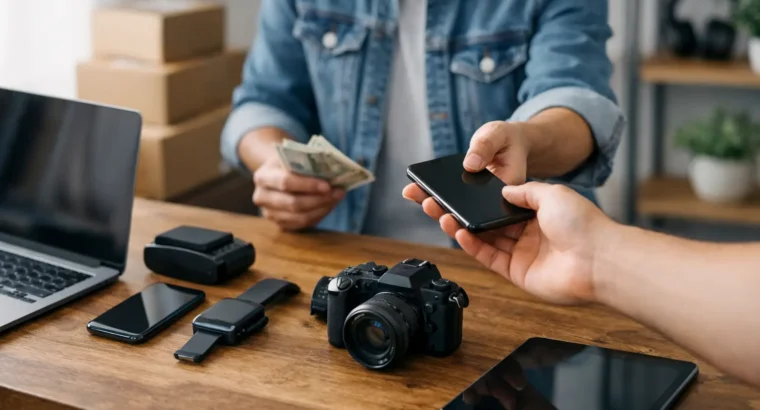
That old phone in your drawer, the laptop you replaced last year, the game console nobody uses anymore – they all have value if you list them the right way. If you want to know how to sell used electronics without wasting time on lowball messages, the process starts before you post the listing.
Electronics sell differently than furniture, clothing, or decor. Buyers care about specs, condition, battery life, storage, accessories, and whether the item works exactly as described. A strong listing answers those questions upfront, gives local buyers confidence, and helps you move the item faster.
How to sell used electronics without common mistakes
Most slow-selling electronics listings have the same problems. The title is vague, the photos are dark, the condition is unclear, or the price ignores what buyers can get locally for similar items. When buyers are comparing multiple listings, small details decide who gets the message first.
The fastest way to improve your odds is to think like a buyer. If you were spending your own money on a used tablet, camera, or laptop, you would want to know the brand, model, age, storage size, cosmetic wear, included accessories, and whether anything has been repaired. That is the information your listing needs.
Before you post, clean the device, remove personal data, and confirm it powers on and works as expected. If there is a defect, say so clearly. A cracked screen, weak battery, or missing charger does not make an item unsellable, but hiding it usually leads to wasted conversations or unhappy meetups.
Wipe your data and prep the device
This step matters more for electronics than almost any other category. Factory reset phones, tablets, laptops, smartwatches, cameras with Wi-Fi features, streaming devices, and gaming systems. Sign out of cloud accounts, remove saved passwords, and disable any device locks or activation locks tied to your account.
If a device stays linked to your profile after the sale, the buyer may not be able to use it. That creates friction for both sides and can turn a simple sale into a long back-and-forth. If you still have the original box, charger, cables, case, or manuals, gather them before taking photos. Complete bundles usually sell faster than the device alone.
Test what buyers care about
A basic power-on photo is not enough for most electronics. Check the screen, speakers, ports, camera, keyboard, trackpad, charging function, Wi-Fi, Bluetooth, and battery behavior if relevant. For gaming systems, test the controller connection and disc drive or digital access. For laptops, confirm the operating system loads properly and that the charger works.
You do not need a lab report. You just need a simple, honest record of what works and what does not. That gives buyers a reason to trust the listing and makes your price easier to defend.
Price used electronics based on local demand
Pricing is where many sellers lose momentum. If you price too high, your listing sits. If you price too low, you may sell quickly but leave money on the table. The right number usually comes from comparing similar items in your area, not from guessing what you paid originally.
Brand, model year, storage capacity, condition, and accessories all affect price. A used iPhone with higher storage and a clean screen will not compete in the same range as one with scratches and no charger. The same goes for MacBooks, headphones, cameras, monitors, and game consoles.
Check what similar items are listed for in your local market, then ask whether your item is better, worse, or about the same. If you want a faster sale, price slightly under comparable listings. If your item is in excellent shape with original accessories, you may have room to ask more, but only if the listing makes that value obvious.
Be realistic about older electronics. Tech loses value quickly, especially when newer models are widely available. Buyers know this. A fair price gets attention. An emotional price usually gets ignored.
Write a listing that answers buyer questions fast
A good electronics listing is clear and specific. Start with a title that includes the brand, model, and key detail buyers search for. “Samsung Galaxy Tab S8 128GB” is much stronger than “Tablet for sale.” “Sony PS5 with controller” is better than “Game system.”
In the description, use short, useful sentences. Include condition, storage or specs, age if known, accessories included, and any flaws. If the battery holds charge well, say that. If there is a scratch on the back but the screen is clean, say that too. Buyers are more comfortable meeting locally when they feel the seller is being direct.
A strong listing might mention that the laptop has 16GB RAM, 512GB storage, includes the original charger, has been factory reset, and has one small dent on the corner that does not affect performance. That level of detail filters out casual questions and brings in better leads.
If you are posting on a local marketplace like Foplak, choose the most accurate category and location. Electronics buyers often browse by category and area first, then narrow by brand or model. Better categorization gives your listing a better chance of being found.
Photos matter more than you think
Use real photos in good lighting. Take shots from the front, back, sides, screen on, and any accessories included. If there is wear, photograph it clearly. A close-up of a small scratch builds more trust than pretending it is not there.
Avoid cluttered backgrounds. Put the item on a table, counter, or clean floor with decent light. For laptops and phones, include one photo showing the device powered on. For consoles, include the system, controller, cables, and any games or extras being sold with it.
Blurry photos lower response quality. Clear photos help serious buyers decide faster.
Handle messages like a seller who wants results
Once the listing is live, speed matters. Electronics buyers often message several sellers at once. If you take half a day to respond, they may already be arranging pickup elsewhere.
Keep replies short and useful. Confirm availability, answer specific questions, and suggest a meetup window if the buyer seems serious. You do not need to write long explanations every time. If the listing already covers condition and included accessories, you can simply point buyers back to those details.
Some negotiation is normal, especially with used electronics. Decide in advance how flexible you are. If your price is already competitive, it is fine to say the price is firm. If you are willing to negotiate, do it with limits. Small discounts for fast pickup are common. Large price cuts usually attract buyers who are not ready to commit.
Watch for time-wasters. If someone asks repeated questions that are already answered, disappears for hours, or keeps changing the meetup plan, move on. A local sale works best when both sides are straightforward.
Meet safely and complete the sale
Local electronics sales should be convenient, but also sensible. Meet in a public place during daylight when possible. Many people prefer busy parking lots, storefront areas, or other visible locations. If the item is higher value, choose a place where the buyer can inspect it comfortably without creating a safety risk.
Let the buyer check the device before paying. That is standard for electronics. They may want to power it on, inspect the screen, or confirm the serial number matches what was described. If you were honest in the listing, this part should be simple.
Cash is common for local transactions, though some sellers prefer digital payment. Either way, confirm payment before handing over the item. If you agreed to include accessories, make sure everything is there before the meetup starts. That keeps the handoff quick.
For very low-cost items, speed may matter more than maximizing price. For higher-value electronics, patience and clear communication usually pay off.
When to bundle, when to split
Sometimes you will get more interest by bundling accessories. A phone with a charger and case, or a console with an extra controller, can feel like a better buy and justify your asking price. Bundles also reduce the number of separate listings you need to manage.
But it depends on the item. A premium camera body may sell better on its own if buyers want to choose their own lens. A monitor might move faster without an older keyboard or mouse attached to the deal. If the extra items are strong selling points, bundle them. If they make the listing feel unfocused, separate them.
Timing can affect your sale
Not every electronics item sells at the same pace year-round. Laptops and tablets may get more attention around back-to-school periods. Game consoles often move faster ahead of holidays. Air conditioners, smart home devices, and other seasonal electronics can also rise or fall with demand.
That does not mean you should wait months to list. It just means expectations should match the market. If you need to sell now, price for now. If you can wait, you may test the market a little higher and adjust based on response.
The best local electronics listings are simple, honest, and easy to act on. Clean device, clear title, real photos, fair price, quick replies. Do those well, and selling stops feeling like a chore and starts looking a lot more like easy extra cash.


Leave your comment